Mastering the Lead to Cash process means finding solutions capable of triggering that virtuous circle of company performance.From lead generation to invoice payment all in one integrated tool.
1. Lead to Opportunity
From Lead Generation to Opportunity Creation
Identification and evaluation of potential customers (Leads) using appropriate lead generation tools. The leads generated and positively evaluated are assigned to a salesperson who will be in charge of converting them into contacts and taking care of the relationship up to the creation of an economic opportunity for the management of the sales negotiation.
2. Opportunity to Quote
From Opportunity to Quotation
The opportunity is accompanied by one or more quotes using technologically advanced tools such as CPQ. Based on the quote selected, a quote can be automatically formulated and sent to the customer.
3. Quote to Order
From Quotation to Sales Order
The quotation sent to the customer is negotiated until a final agreement is reached. Once the sales order is received, the opportunity is converted into a contract.
4. Order to Cash
From the Sales Order to Invoice Collection
The sales order is the starting point for the sale of the good/service or the opening of a job order. With their delivery, invoices are issued, monitoring that payments are made in compliance with deadlines.
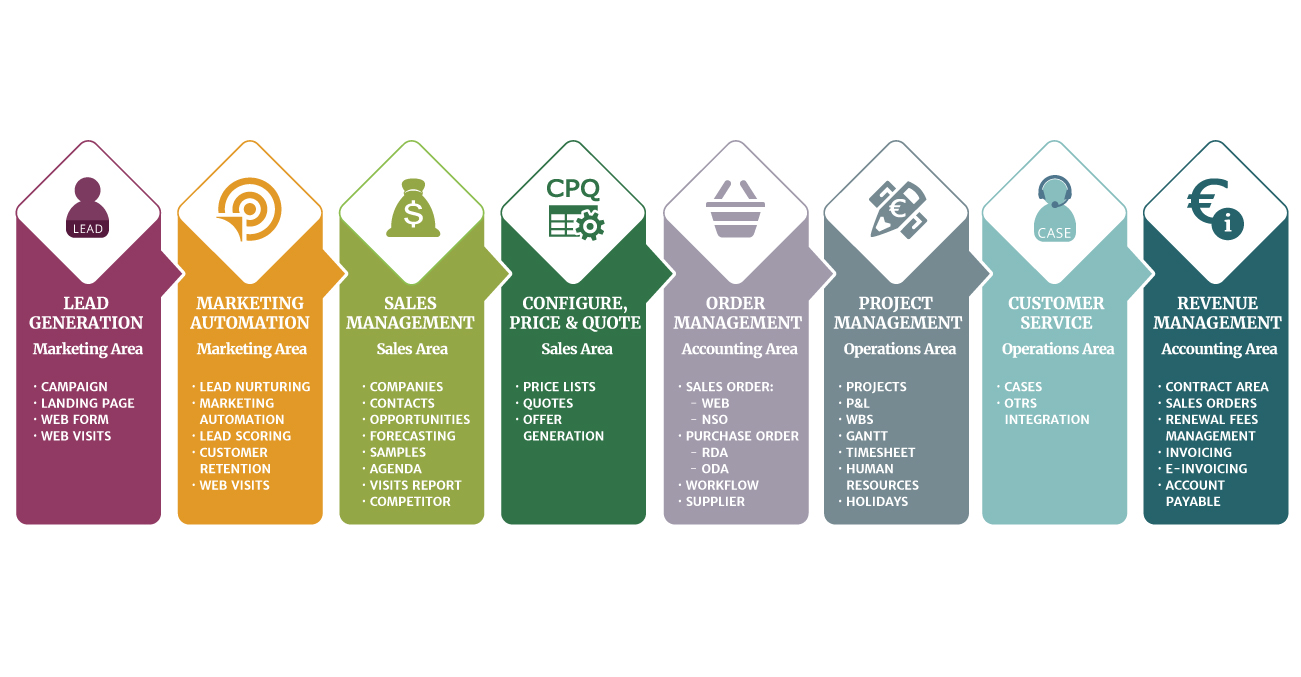
Acquire leads across multiple touchpoints.
Assign the lead with high score to the relevant salesperson.
Qualify and evaluate leads giving priority to the most interesting ones.
After the salesman's positive feedback, convert the lead into a contact.
Increase the knowledge that leads have of your company.
Identifies opportunities with more high potential.
Configure quotes
in a structured way.
Define the characteristics of the opportunity.
Send the estimate
to the customer.
Manage product samples
.
Preside over information
about the opportunity.
Manage the quote
negotiation
Approve the sales
order.
Monitor the status
of the listing.
Convert the opportunity
into a contract.
Validate the sales
order.
Invia l’ordine di vendita
al gestionale.
Plan activities, allocate resources, manage orders.
Manage customer assistance services: customer care and case management
Monitor revenues, costs, expenses, profit margins and economic variances.
Issue an invoice and check the collection.
Close the job order
when the project is completed
Close the contract. Are there new sales opportunities? Restart the process!